


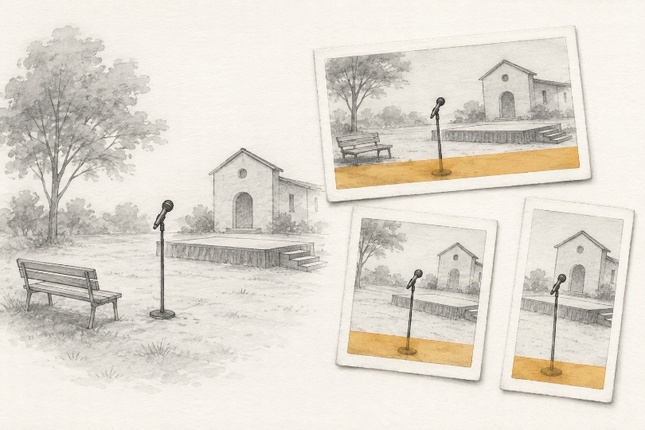
A still that works in a newsroom preview can fail on air. The presenter appears in a clean 16:9 frame, but a vertical social crop cuts the microphone. A lower-third covers the only visible damage. A square app tile removes the person looking toward the event. None of those failures begins with image quality. They begin when one master is asked to survive several transmission windows.
Treat every output as a crop test before treating it as an edit. An AI Photo Editor can help prepare a candidate, but it cannot know which corner the channel logo occupies or how much room the producer needs for a name strap. Those safe areas must be mapped first.
Map Each Crop Against Its Real Overlays
Collect the actual delivery frames: the broadcast master, web article hero, square app tile, vertical short-video cover, and any regional affiliate crop. Add the fixed overlays used in each destination. These may include a channel bug, ticker, lower-third, live flag, caption band, or player controls.
Now place the source inside every frame without altering it. Mark three zones. The protected zone contains faces, hands, microphones, visible damage, maps, and objects that support the story. The overlay zone will be covered by graphics. The flexible zone can accept extra background or a tighter crop without changing the apparent event.
| Destination | Likely collision | Pass signal |
| 16:9 broadcast | Lower-third covers hands or evidence | Protected action stays above the strap |
| 1:1 app tile | Side subjects disappear | Crop keeps the caption's main actor |
| 9:16 social cover | Wide context is lost | Key subject and location cue coexist |
| Web hero | Headline overlaps a face or sign | Text sits in the flexible zone |
The matrix turns “leave some space” into observable conditions. It also reveals when one master cannot honestly serve every outlet. A vertical frame may need a different source rather than generated scenery around a wide shot.
Prepare One Candidate Through Four Checks
PicEditor AI offers prompt-led image changes, including edits to a background. Here the useful test is whether additional neutral space can accommodate a planned graphic without disturbing the original scene. A newsroom may rule out generated changes to documentary images altogether. In that case, use this procedure for permitted promotional stills, or test crops of the untouched photograph.
Upload the Uncropped File With Useful Edge Detail
Start with the best available uncropped file. Preserve it unchanged and note its origin. A screenshot from a rundown or social post may already have baked-in graphics, compression, or a crop that removes useful context.
Check all four edges before upload. A hand, second person, vehicle, sign, smoke plume, cable, or reflection near the boundary may look expendable until a narrow destination makes it central.
Describe Only the Space Around the Subject
If the source needs more neutral room for a headline, describe only that region: “Extend the plain wall on the right. Keep every person, face, hand, microphone, sign, building edge, shadow, reflection, camera angle, and existing crop content unchanged. Add no words, logos, people, objects, screens, or weather.”
AI photo editing works better as a bounded candidate step than as a request to make the image broadcast-ready. Broadcast-ready is a production judgment; it does not tell an editor which pixels may move.
Generate a Candidate Then Apply Production Graphics
Choose the necessary output controls before generating and keep the candidate count manageable. More variations do not solve a weak safe-area map. They multiply the number of faces, hands, letters, and edges that someone must compare.
PicEditor AI should stay out of fixed broadcast graphics. Add the channel logo, lower-third, ticker, captions, and live labels in the approved graphics system after the image candidate passes. Generated text can look convincing while carrying the wrong name, place, time, or spelling.
Preview the Longest Graphic in Every Destination
Place the candidate into the actual templates, not hand-drawn guesses. Test the longest likely lower-third, the ticker at its normal height, the mobile controls, and the full headline treatment. Check the first frame of any animated overlay as well as its settled position.
Read the caption while looking at each crop. If the text mentions two people, a vehicle, a damaged area, or a location marker, the corresponding evidence must remain visible or the caption must change. Do not let a crop imply that the absent context never existed.

Reject Crops That Change the Story
The most useful measure of AI photo editing here is how many required destinations the reviewed still can serve. A candidate that survives the television frame but fails the app tile remains a partial solution. Keep that distinction visible in the producer's approval rather than attaching a single pass label to the master.
Overlay source and candidate at equal size. Trace faces, hands, equipment, signs, building lines, vehicle positions, shadows, weather, and boundaries between objects. New repeated texture may signal an extended area that deserves closer inspection. A relight that moves attention away from evidence can be a failure even when no object changed.
Then classify every crop as pass, alternate source, or reject. Pass keeps the story's protected zone readable. Alternate source means the destination needs a differently composed photograph. Reject covers invented context, distorted anatomy, changed text, removed evidence, or an overlay collision that reverses emphasis.
An AI Photo Editor works on the still before the transmission system adds its own graphics. A clean preview therefore cannot confirm downstream safe areas, caption timing, or affiliate templates. PicEditor AI can prepare a candidate; the desk must validate the complete frame viewers receive.
For a hypothetical festival interview still, imagine a performer standing beside an instrument near the lower edge. The broadcast crop preserves both until the name strap rises. Moving the crop upward then cuts the venue sign. This is a collision between three useful details, and extending the sky will not resolve it. A second photograph with more space beneath the instrument is the better delivery asset.
Other failures appear only after a handoff. An affiliate may use a deeper strap, while the website centres its crop automatically around a different point. Ask those destinations for their actual preview before approving a shared master. If a required preview is unavailable, mark that destination as untested and send a separately composed fallback. An assumption about a downstream template should not become an invisible approval.
Keep the source, candidate, matrix, template previews, final crops, and approval together. Name the destination in every filename or asset record. “Final.jpg” becomes dangerous as soon as the same picture has four finals.
One Master Is Not Always the Right Answer
Use PicEditor AI when a strong source needs a narrow background, lighting, or cleanup adjustment and the protected evidence already fits the planned crops. Choose another photograph when a vertical or square frame cannot hold the required people and place context. Do not generate missing news evidence to rescue a layout.
A reliable desk does not approve the prettiest master and hope every channel behaves. It tests the source against the real windows, edits only a flexible region, and rejects any output that changes what the still appears to prove.
The finished image should arrive with its destination already understood. When the logo, caption, lower-third, and crop all land without covering the story, the still is ready for transmission.