



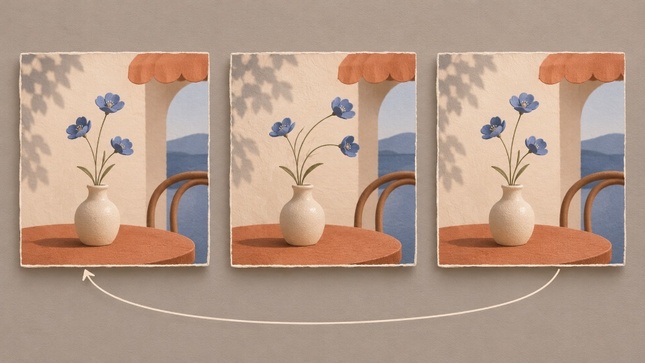
A vase of flowers moves gently on a café screen. The light is warm, the shot looks inviting, and then the picture jumps. A blossom that was leaning left snaps upright. The clip begins again, making the same little interruption every few seconds.
A short decorative video often spends much of its life repeating. The most impressive frame is therefore a poor basis for choosing it. The last frame has to hand attention back to the first. When that handover is distracting, even a pleasant clip can become irritating in the background of a room.
How the Reset Becomes Part of the Picture
During a single playback, viewers follow the movement forward. A curtain lifts, a shadow crosses the table, or a camera moves closer to a cup. At the end, each of those actions has changed the scene. Restarting the file returns everything to its earlier position in one step.
The jump may be hard to notice while reviewing a collection of different clips. Each preview ends, and your attention moves to the next candidate. A display repeats the same transition instead. A small inconsistency gets another opportunity to draw attention every time the video starts over.
Consider the café flowers as a hypothetical example. If the final frame shows a different arrangement of petals, a smooth camera movement inside the clip will not hide the reset. The viewer sees the flowers return to an earlier state. If the camera also ends closer to the vase, the entire composition seems to step backward.
The right question is how much attention the repeated join should receive. A decorative display usually needs very little. A deliberate comic repetition might welcome an obvious restart. Set that intention before deciding that any visible transition is automatically a fault.
The screen's setting matters too. A brief interruption can be conspicuous in a quiet waiting area and almost irrelevant beside a busy counter. Review the clip for the place it will occupy. A large monitor close to seated visitors invites a different level of inspection from a small screen across a room.
Choose Motion That Can Return Without a Visible Reversal
Some actions are easier to repeat convincingly than others. A soft shimmer has fewer obvious milestones than a person walking through a doorway. The walking subject has to return to the starting position somehow. Repeating the clip does that abruptly unless the edit provides another explanation.
Camera movement creates a similar problem. A slow move toward a vase can be beautiful within the shot, but the restart moves the viewer away again. A nearly stationary composition leaves fewer large shapes to realign. That does not guarantee a clean loop; it simply removes one common cause of a conspicuous reset.
Describe a restrained motion brief for the intended use. For the café example, the desired movement might be a subtle change in light around an otherwise steady arrangement. Avoid combining a large camera move, changing objects, and strong environmental motion before you have found out whether a simpler idea can repeat comfortably.
Also decide what must remain fixed. The vase, tabletop edge, and background window provide strong visual reference points. If they shift between the beginning and end, the viewer has an easy way to detect the restart. Tiny differences in a soft background are often less distracting than a jump in one of those high-contrast edges.
Review the Generated Candidate as Two Consecutive Copies
AI Video Editor can generate clips from a text description or animate a still image, so it can supply short moving material for this kind of display. A short clip is not automatically a seamless loop, though, and the result still needs to be reviewed as a repeating sequence.
Using an AI video editor to animate a prepared still can give the experiment a clear starting composition. Choose an image whose main shapes already work on the display. Describe the small movement you want. Some models on the site, such as Veo 3.1, accept both a first and a last frame, and supplying the same still for both can nudge the clip back toward its starting composition. Even then, check the join instead of assuming the end matches the start exactly.
Place two copies of the clip back to back on the timeline of an ordinary editing application, and play through the join without pausing. Look for a sudden shift in the vase, a change in the crop, or a jump in brightness. Keep both copies at the same speed and size so the edit itself does not create a new discontinuity.
Then inspect the final and opening frames side by side. The comparison helps explain a jump you noticed at normal speed. It should not replace watching the transition: two similar still frames can conceal a sudden change in the direction or speed of movement.
For anyone using a prompt to edit videos online, this review also produces a more useful revision request. “Keep the camera stationary” addresses a visible cause. “Make it smoother” leaves the nature of the problem unclear. If a change in the flowers causes the reset, reduce that movement rather than adding an unrelated effect.
AI Video Editor can generate another version for comparison. Keep the previous result long enough to see whether the revision actually improved the join. An attractive new lighting treatment can otherwise distract you from the same unresolved movement at the end.
Decide Whether a Transition Would Obscure Something Important
A dissolve between the end and beginning can soften a small change. It can also produce a double image: two vase edges or two positions of a flower visible at once. Watch the overlap before deciding it has repaired the problem. The more solid and still the scene is meant to look, the more that ghosting matters.
A longer piece can sometimes be more appropriate than forcing a short shot into repetition. The restart happens less frequently, although it still needs consideration. A stationary image is another reasonable choice when movement contributes little and the display mainly needs to establish a mood.
If the video contains practical information, such as an event time added in a separate layout, keep that text stable and readable across the join. Do not let a transition briefly erase the details. Decorative motion should not make a visitor wait for the useful part to return.
Approve the Clip After Several Ordinary Repeats
Leave the proposed sequence playing while you look away and return to it. A join that seemed minor during close editing may be the first thing you notice on returning. Make the decision from that repeated experience rather than from the best moment inside one pass.
Before the clip goes on the café screen, generate one restrained version in AI Video Editor and set it beside a still of the same arrangement. Leave both running for a few minutes. If the moving version keeps pulling your eye back at the join, use the still. A background display is working when visitors stop noticing it restart.